omnisense
Case 27 / 28
2026
  • Contest entry · Telegram
  • Mobile app
  • contest entry · messaging

Telegram Nodes

One account, many faces — and one space per community. We simplified the flow and refreshed the screens of a Telegram contest entry.

One account, many faces: Nodes group a community’s channel, chat, rooms and apps in one space — and you join each one as the alias that fits.

Motion preview — 0:13 loopPress your avatar and slide to Dalle → join Design Team as Dalle → the Node workspace → the Meeting room.
Services
UX audit · Flow simplification · UI refresh · iOS + Android · Interactive prototype
Platform
iOS 402 + Android 412 · contest entry
Year
2026
Type
Contest entry · Telegram
Key decisions
  • Copy and labels
  • Visible states
  • One primary action

Disclaimer. Official entry to the Telegram design contest. The feature shown has not been released and is not an official Telegram product.

01Overview

A contest entry, refreshed like a product we would ship.

The idea

Telegram mixes work chats, hobbies and anonymous communities in one flat list. Nodes group a community’s channel, group, topics, voice chats and Mini Apps into one space — and Aliases let one account be «CEO Alexander» in a work Node and «Anon_Dragonslayer» in a gaming one, without exposing the phone number.

What we did

Audited the contest file (14 findings), cut the flows that took the most steps, refreshed four key screens on iOS and Android in one design language, drew two component sheets and built a clickable iOS prototype of the new flow.

Where the work stands

The contest file had 22 iOS and 13 Android frames, user flows and a code-based POC. This page shows the four screens a person meets first; admin tools (settings, layouts, roles) are out of scope for this round.

About this project

Telegram Nodes was designed and submitted as an official entry to Telegram’s design contest. It is a proposal, not a shipped feature: nothing here is live in Telegram, and no usage figures are implied. Telegram and its interface are trademarks of their owner and appear as the context the entry was designed for.

4 × 2key screensiOS + Android, same states and sample data
14audit findingsP1 errors · P2 UX · P3 polish
3 → 2steps to create a Nodetemplate merged into step one
2 → 1primary actions in Joinone «Join as …» button
Design facts from the concept files — not business results.

02Research

A strong idea, hidden behind small frictions.

We read every frame of the contest file (iOS and Android pages) and the project report, listed what already works, and sorted 14 improvements by how visible they are.

We read every frame of the contest file (iOS and Android pages) and the project report, listed what already works, and sorted 14 improvements by how visible they are.

  1. Identity

    The core innovation — one account, many faces — is a row of unlabelled emoji pills in the toolbar. Nothing says who you are now, or what others will see.

    DecisionKept the entry’s gesture and its side capsule: press your avatar and a slim capsule of faces slides out of it, slide the finger along to an alias, letting go switches the list. The name under the finger previews under the title («as Dalle»), a hint card explains the alias view, and Join adds roles and a privacy line.

  2. Join

    The Join sheet had two primary actions (an «↑» in the corner and «Join»), and the alias choice sat behind «Change» with no picker designed.

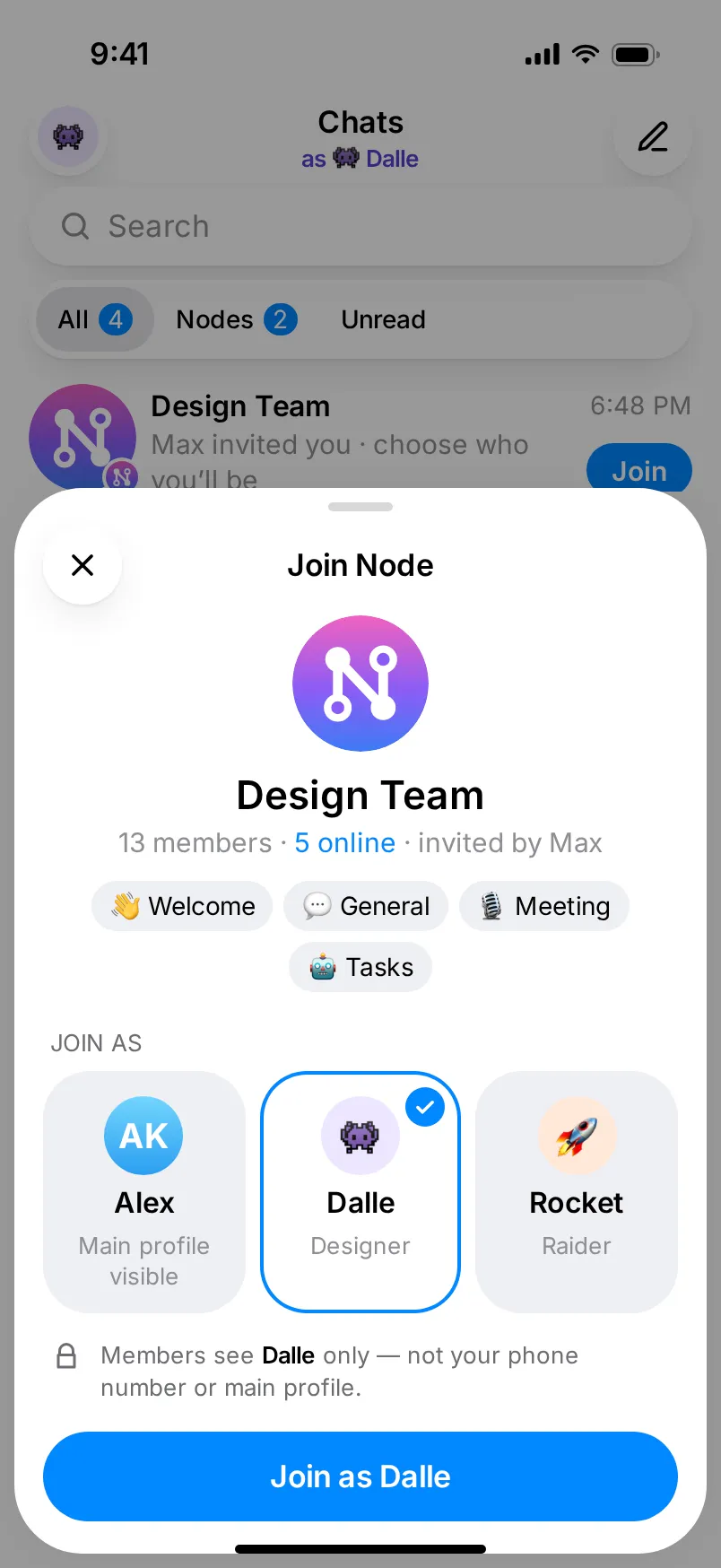
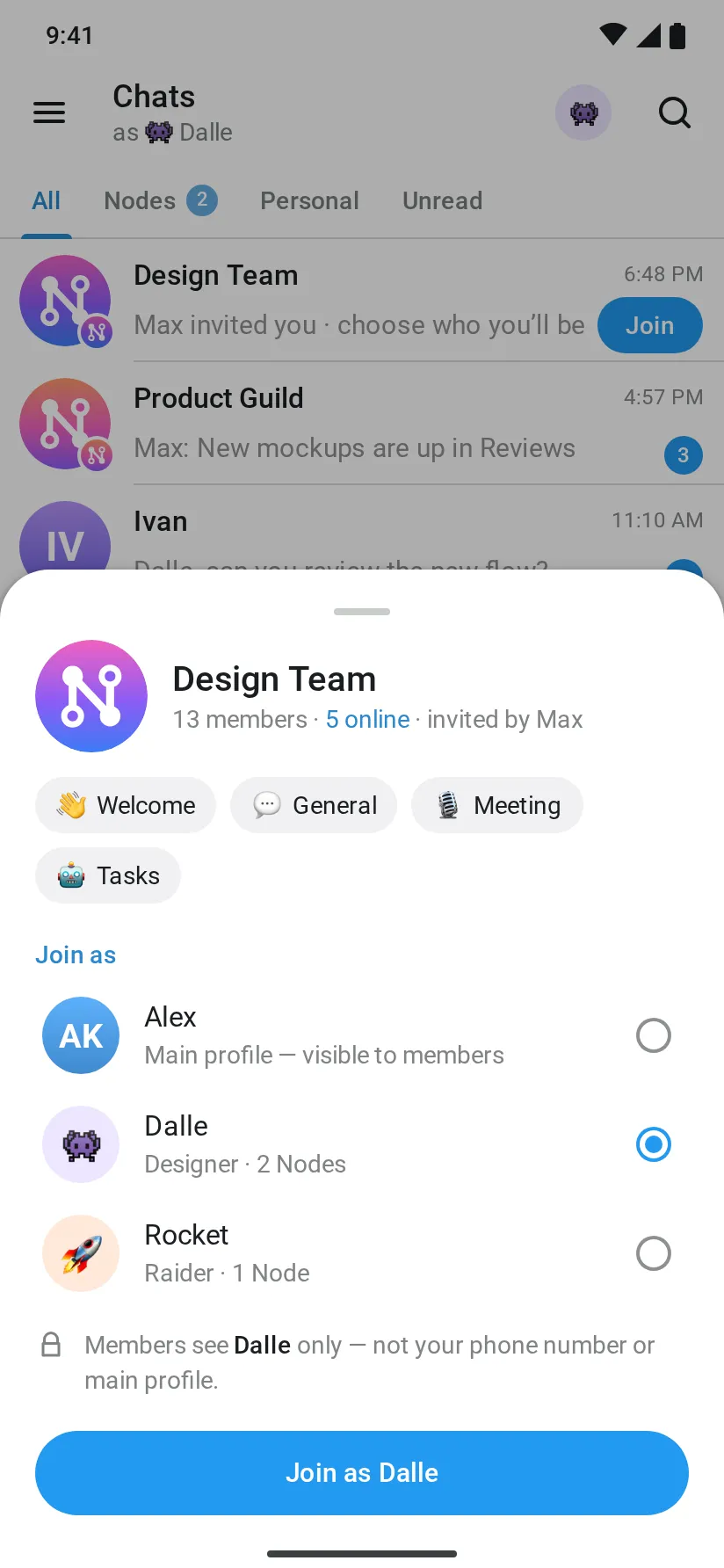
    DecisionOne sheet: what is inside the Node, three alias cards to pick from, one «Join as Dalle» button.

  3. Wizard

    Three steps (Identity → Template → Privacy) with no selected state and «Next» drawn as a send arrow, active before anything was chosen.

    DecisionTwo steps — name & template, then you & privacy — with checkmarks, a disabled «Next» until the name is filled and live link checks.

  4. Workspace

    The branch sidebar is the most recognisable part, but a message field sat under voice rooms and Mini Apps, where there is nothing to type.

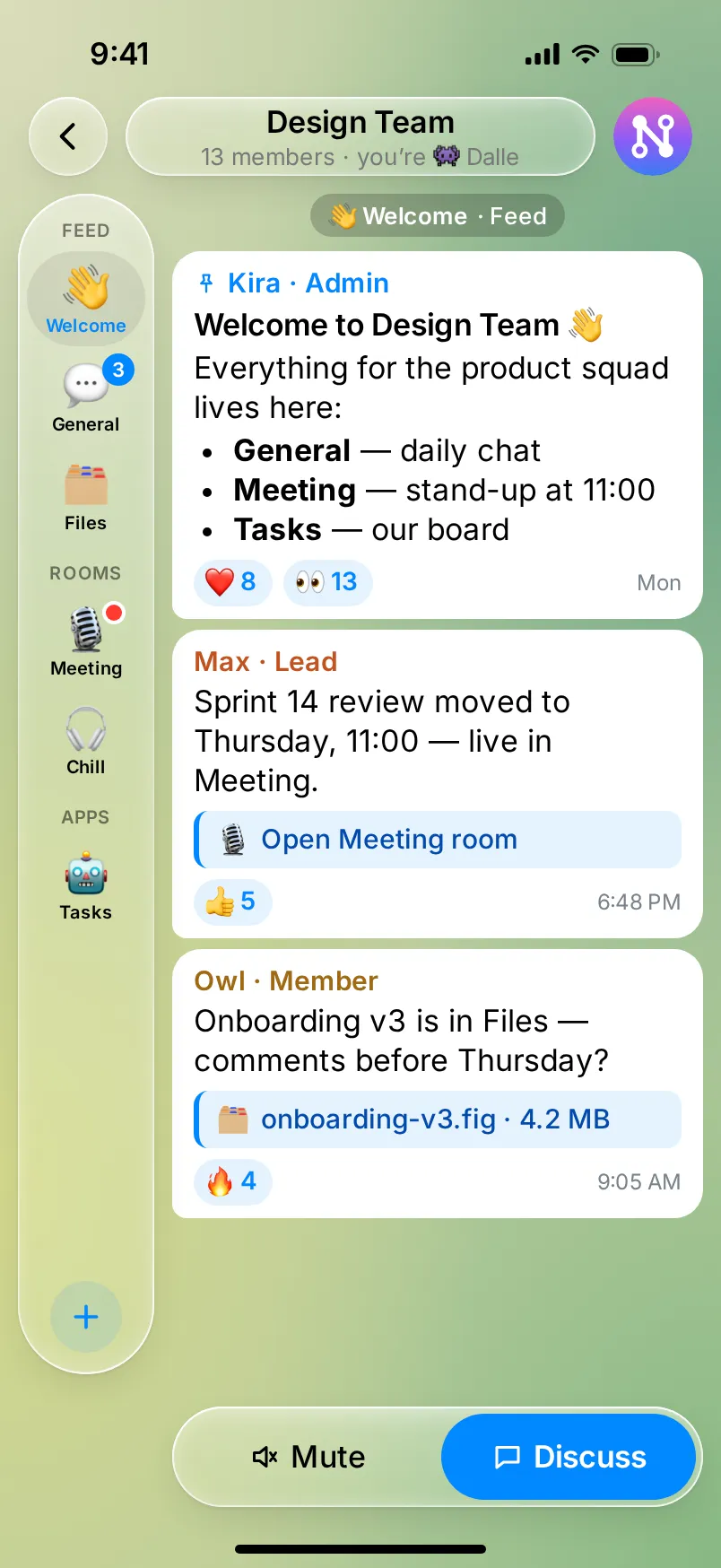
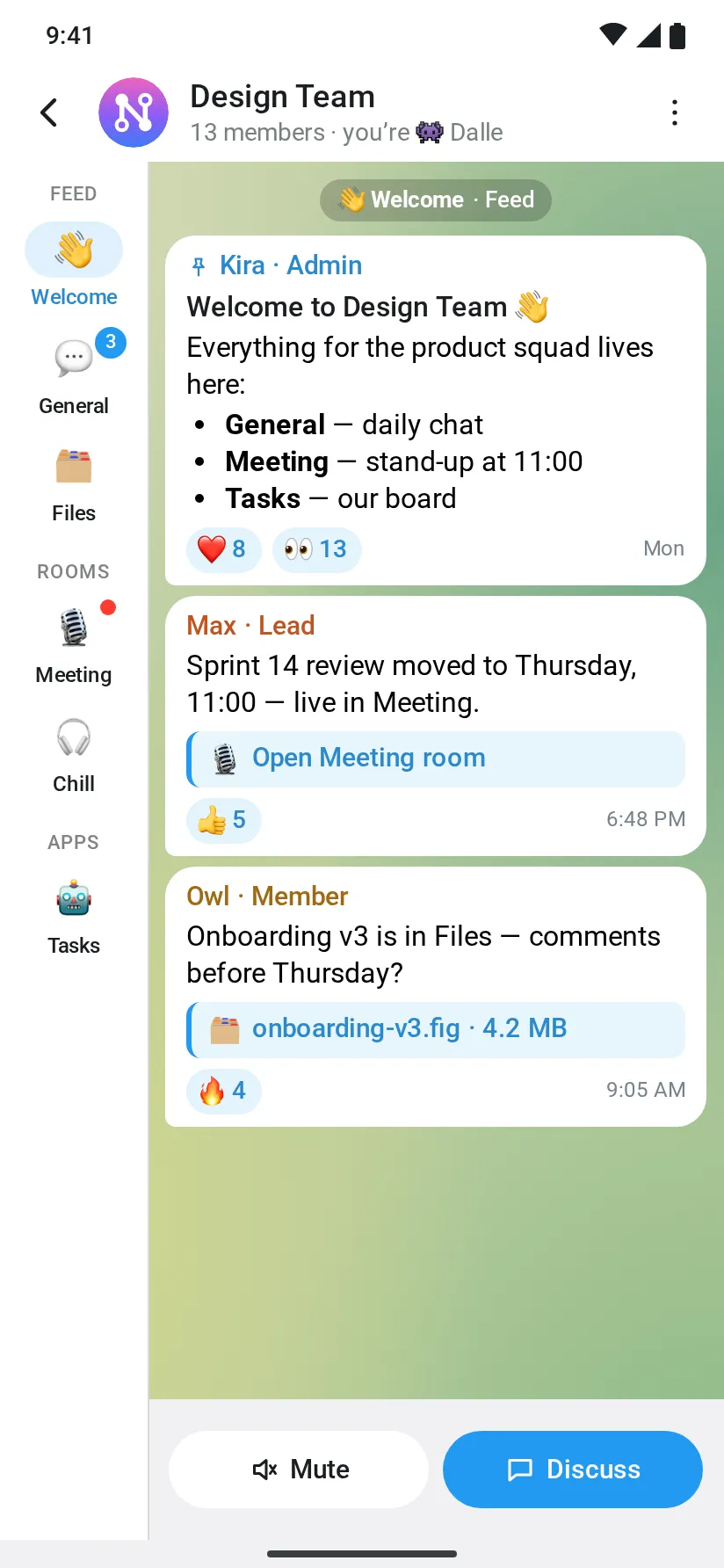
    DecisionA branch rail in iOS 26 Liquid Glass, a composer only in chat branches, a room card that says which alias you join as.

  5. Android

    The Android page reused iOS pills and the iOS «Change» capsule, had typos («joinig», «Broadcasts & News» on every row) and a wrong step title.

    DecisionMaterial 3 structure in Telegram Android’s colours, no iOS glass: white app bar with the press-and-slide identity button, tonal surfaces, bottom sheet, navigation rail, M3 navigation bar with Telegram’s default tabs, FAB, full-screen dialog.

Patterns we borrowed

The contest file
The idea, the Node and Alias model, the screen list and Telegram’s own patterns — kept
Telegram’s open-source clients
Colours, sizes, radii and type scale read from Telegram iOS and Android source code — every value traced to a file and line
iOS 26 Liquid Glass
Apple’s clear glass on iOS — light tint, blur, specular rim and an edge highlight; Material 3 tonal surfaces on Android
Apple emoji
The emoji set Telegram shows on every platform, used as images, as Telegram does
Telegram itself
Folders, Topics, Voice Chats and Mini Apps as the blocks a Node wraps

What we left out

Telegram’s logo inside the screens, doodle wallpapers, photos of real people and third-party logos used as avatars in the contest file — replaced by initials, emoji and our own gradients. No new features beyond the file: the Gifts & Masks economy from the report is not drawn.

Moodboard references

03Before → After

From a wireframe to Telegram-native hi-fi.

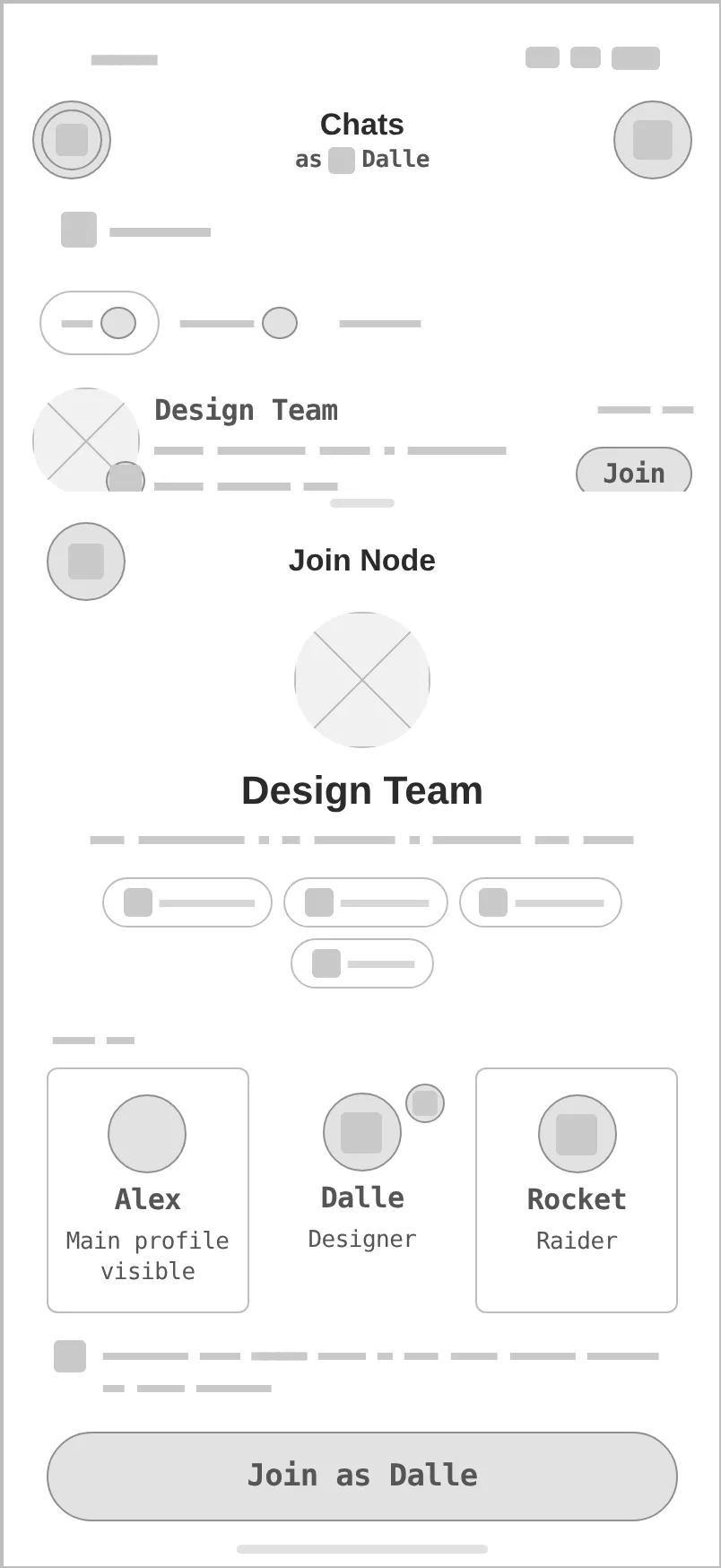
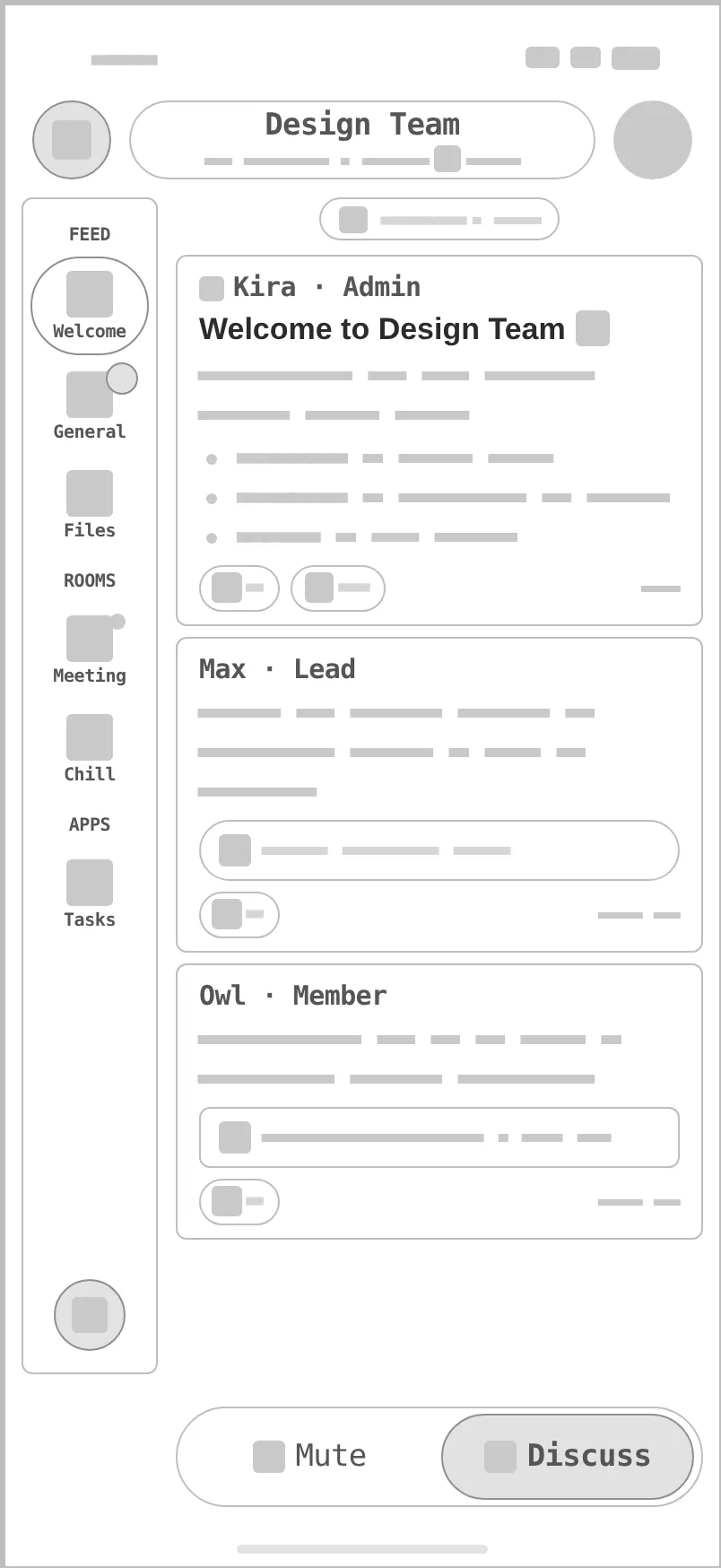
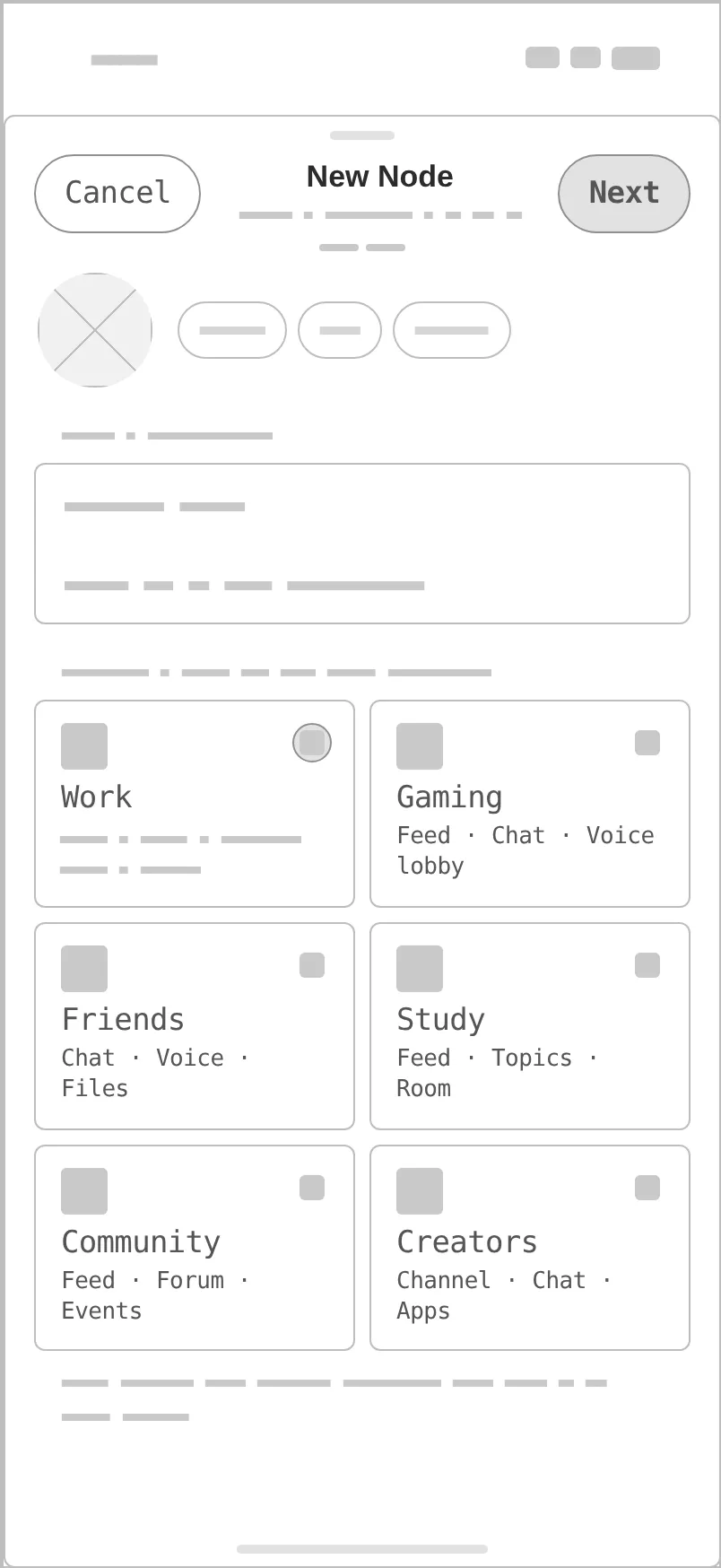
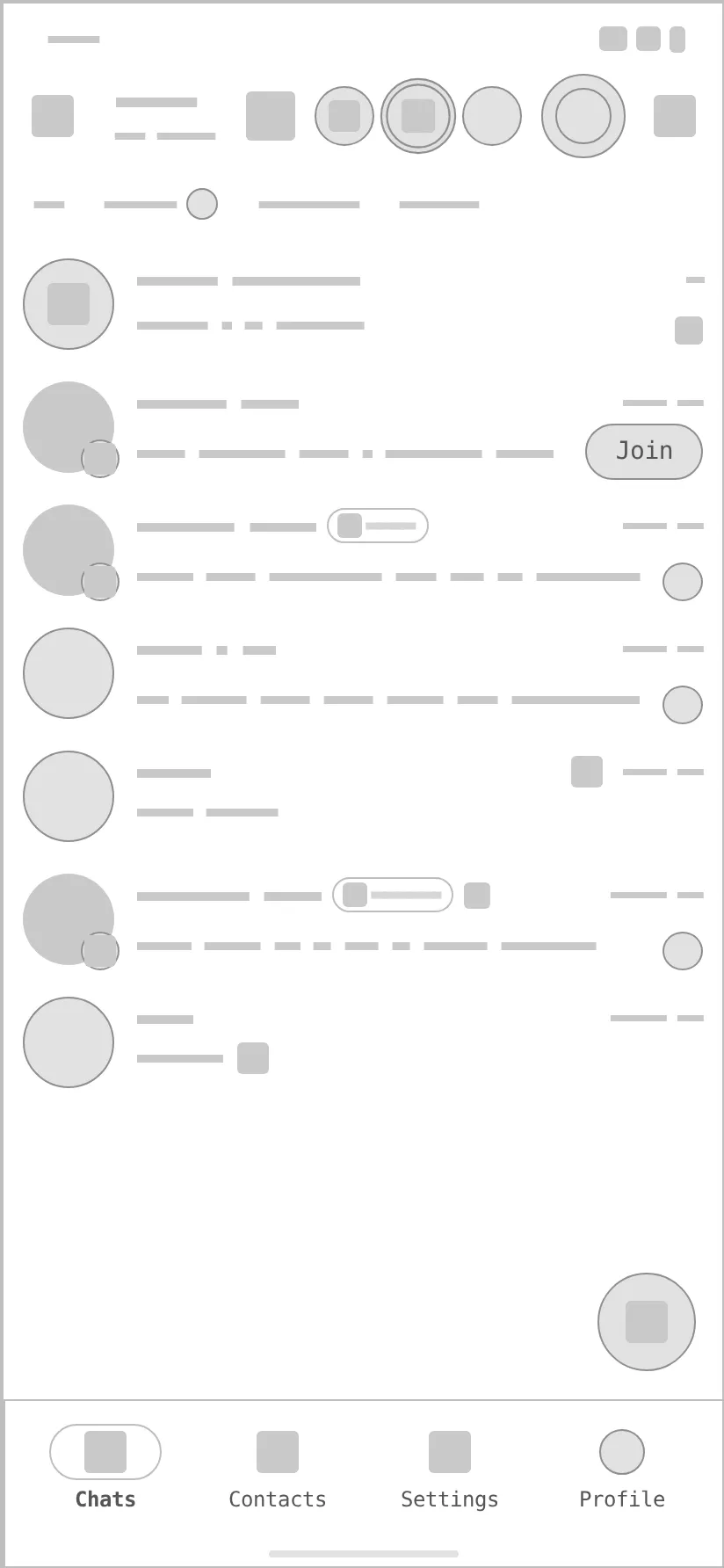
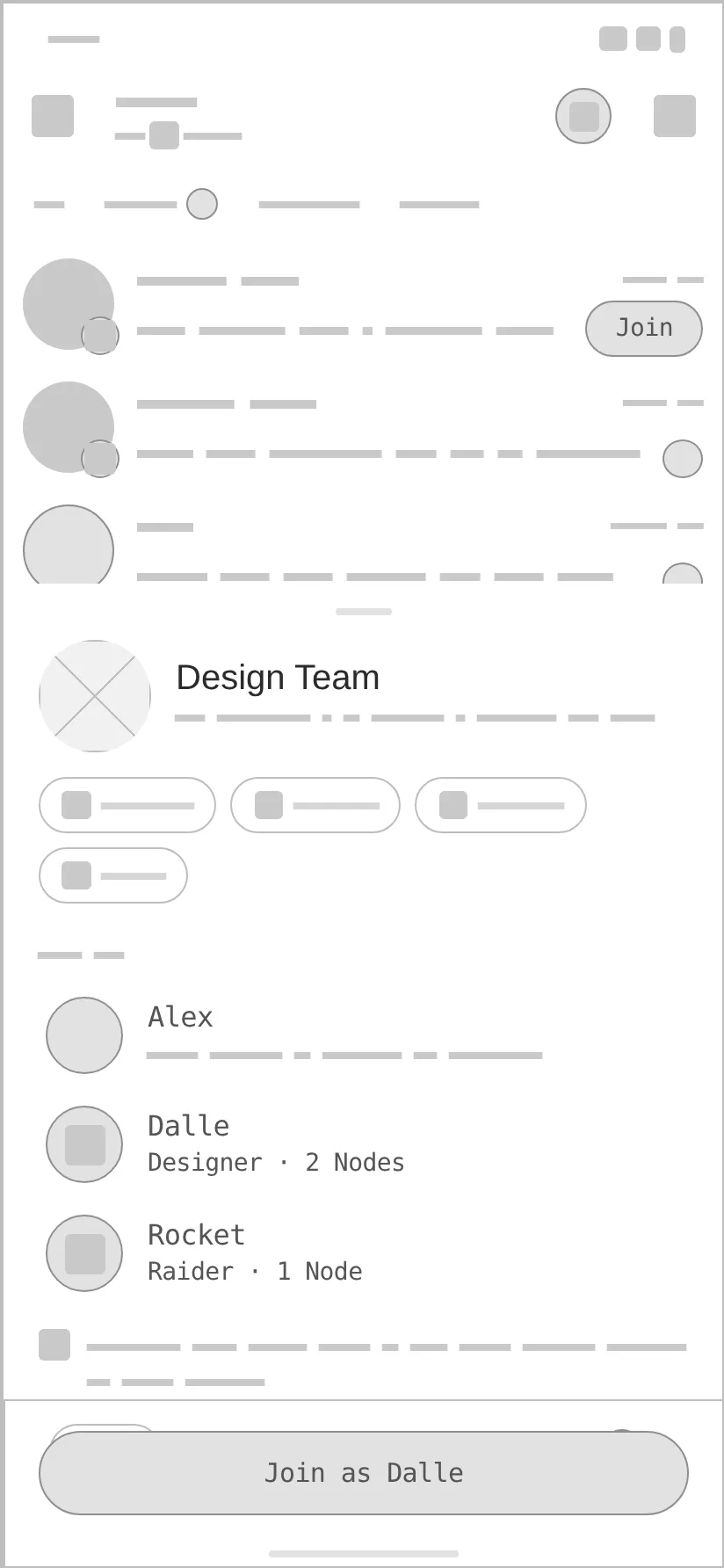
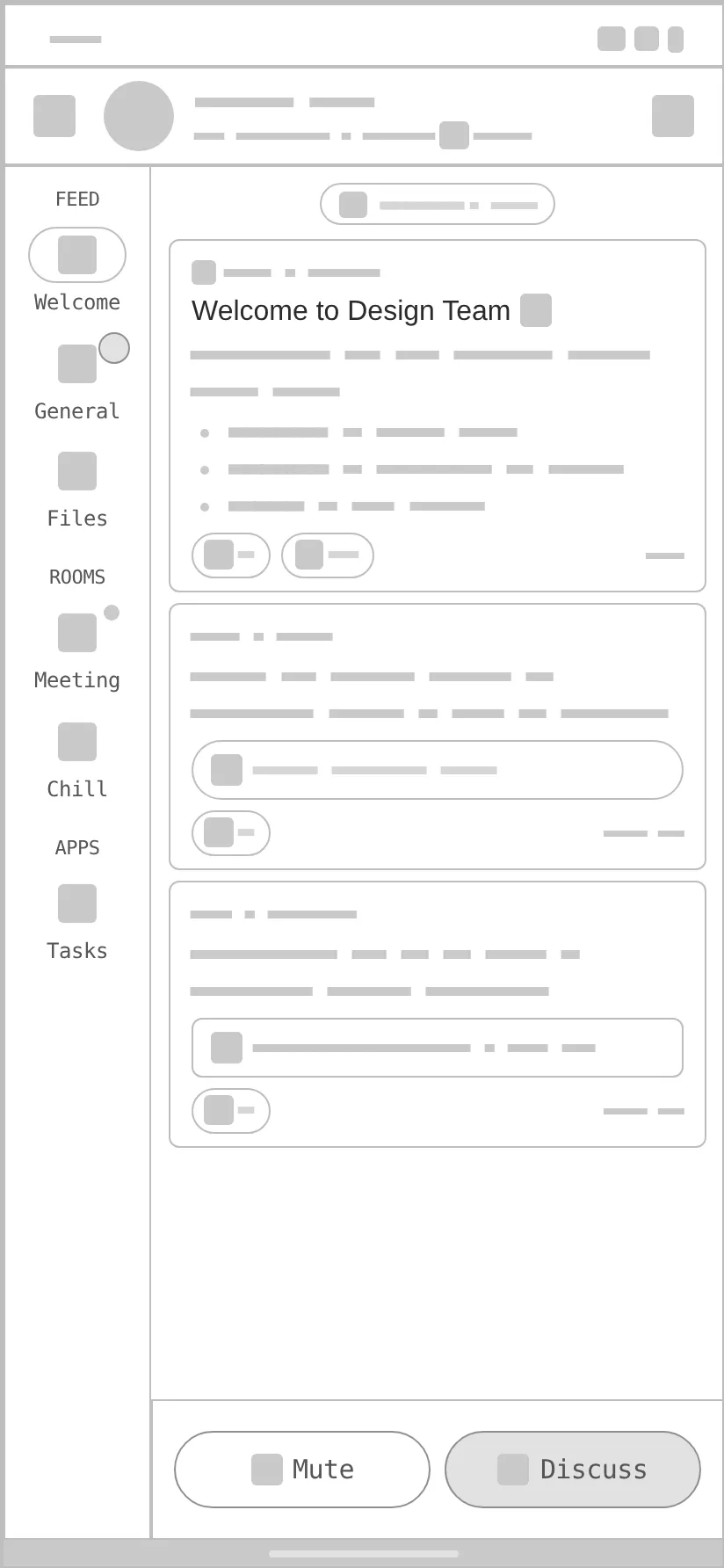
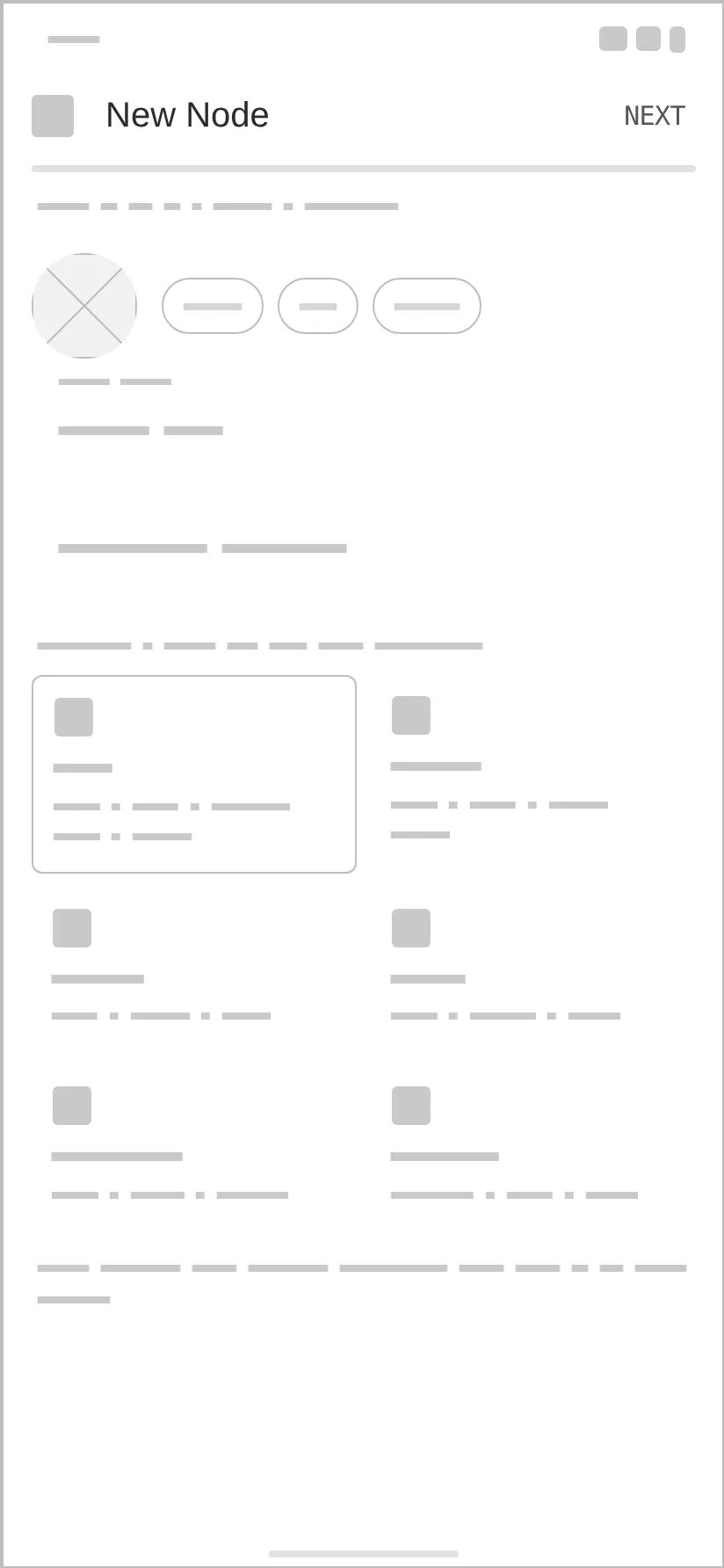
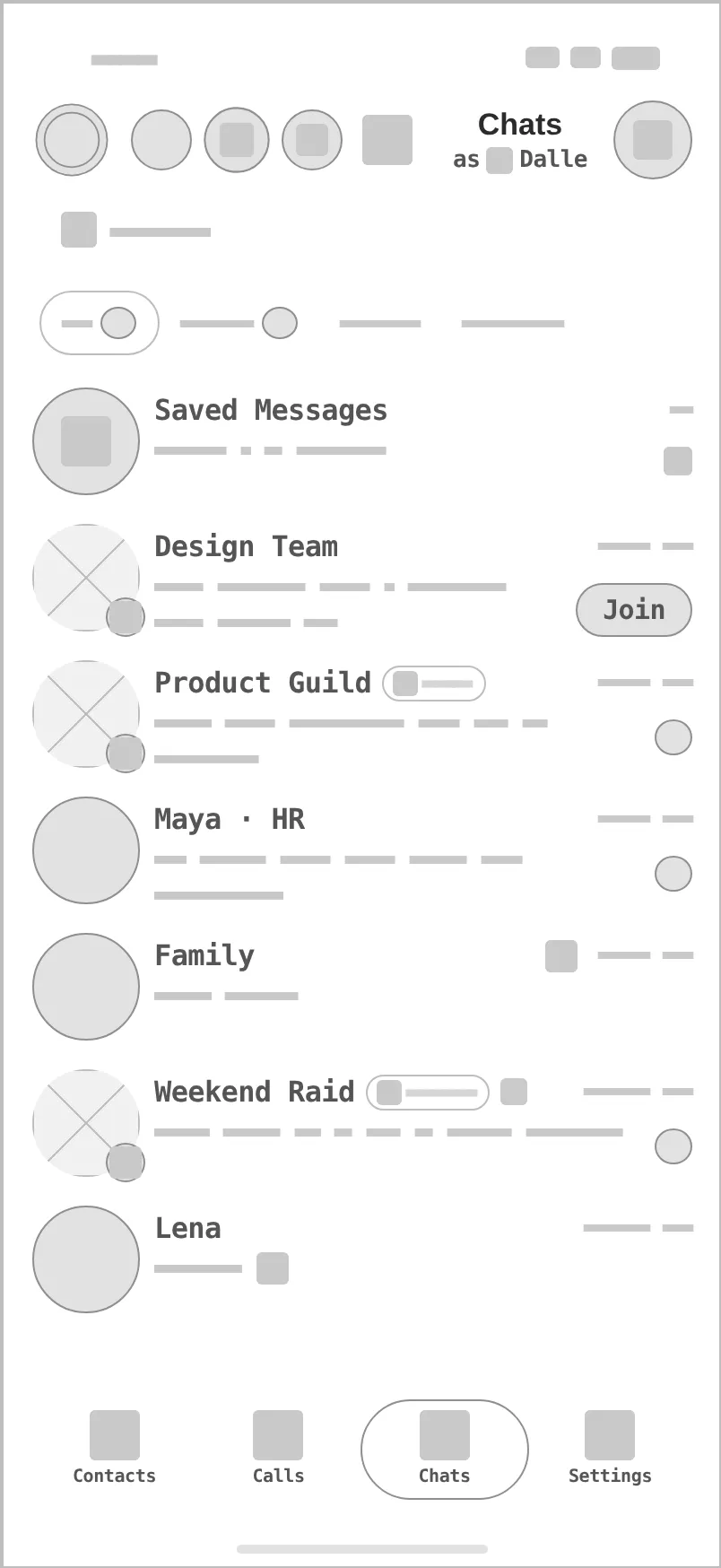
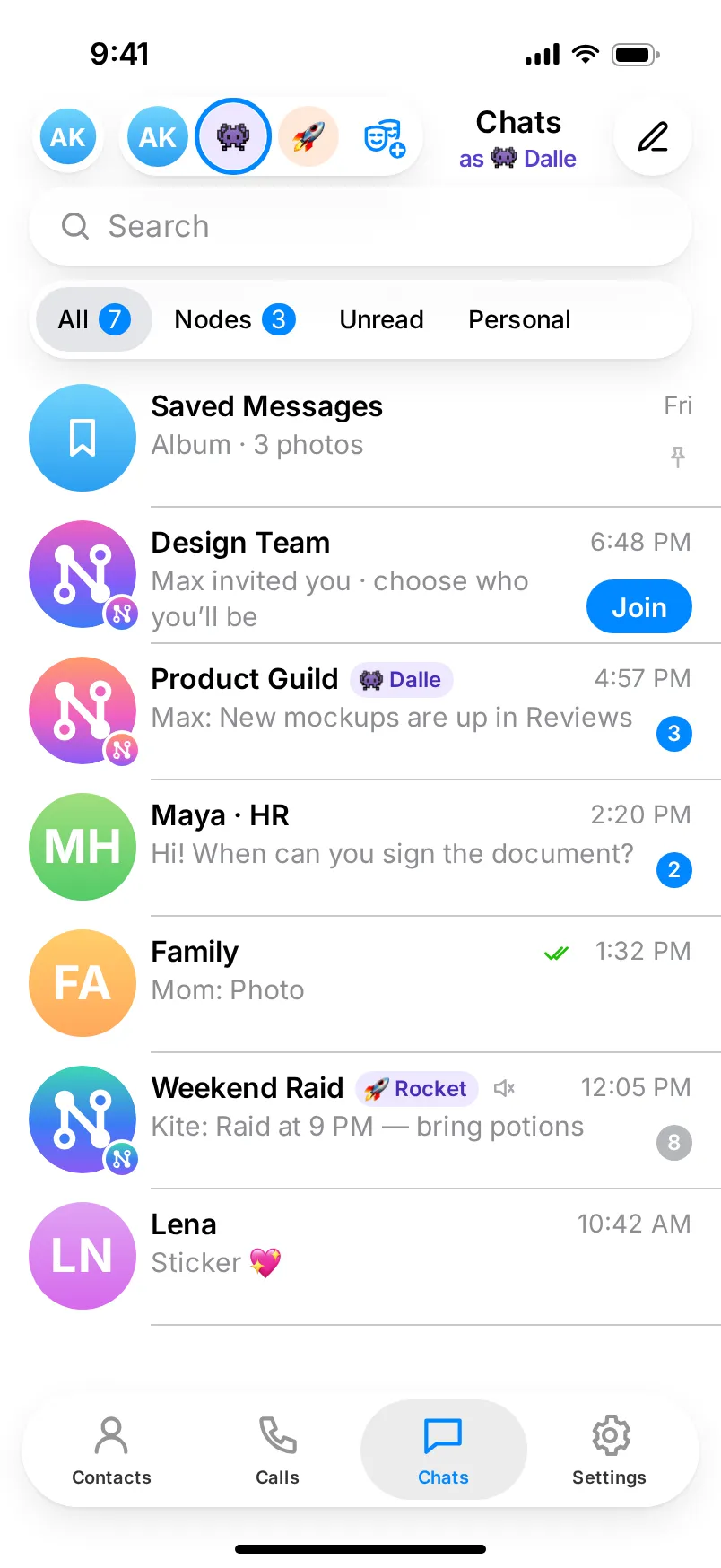
Every «before» is generated from the very same screen markup, reduced to outlines, readable labels and grey word-bars — no colour, emoji or glass. The «after» uses Telegram’s own tokens on iOS and Android. Drag a handle to compare.

iOS

Before — Chats · switch identity, iOS, frame from the low-fi wireframe
After — Chats · switch identity, iOS, refreshed design
After · hi-fiBefore · wireframe
Chats · switch identity
Before — Join as an alias, iOS, frame from the low-fi wireframe
After — Join as an alias, iOS, refreshed design
After · hi-fiBefore · wireframe
Join as an alias
Before — Node workspace, iOS, frame from the low-fi wireframe
After — Node workspace, iOS, refreshed design
After · hi-fiBefore · wireframe
Node workspace
Before — New Node · template, iOS, frame from the low-fi wireframe
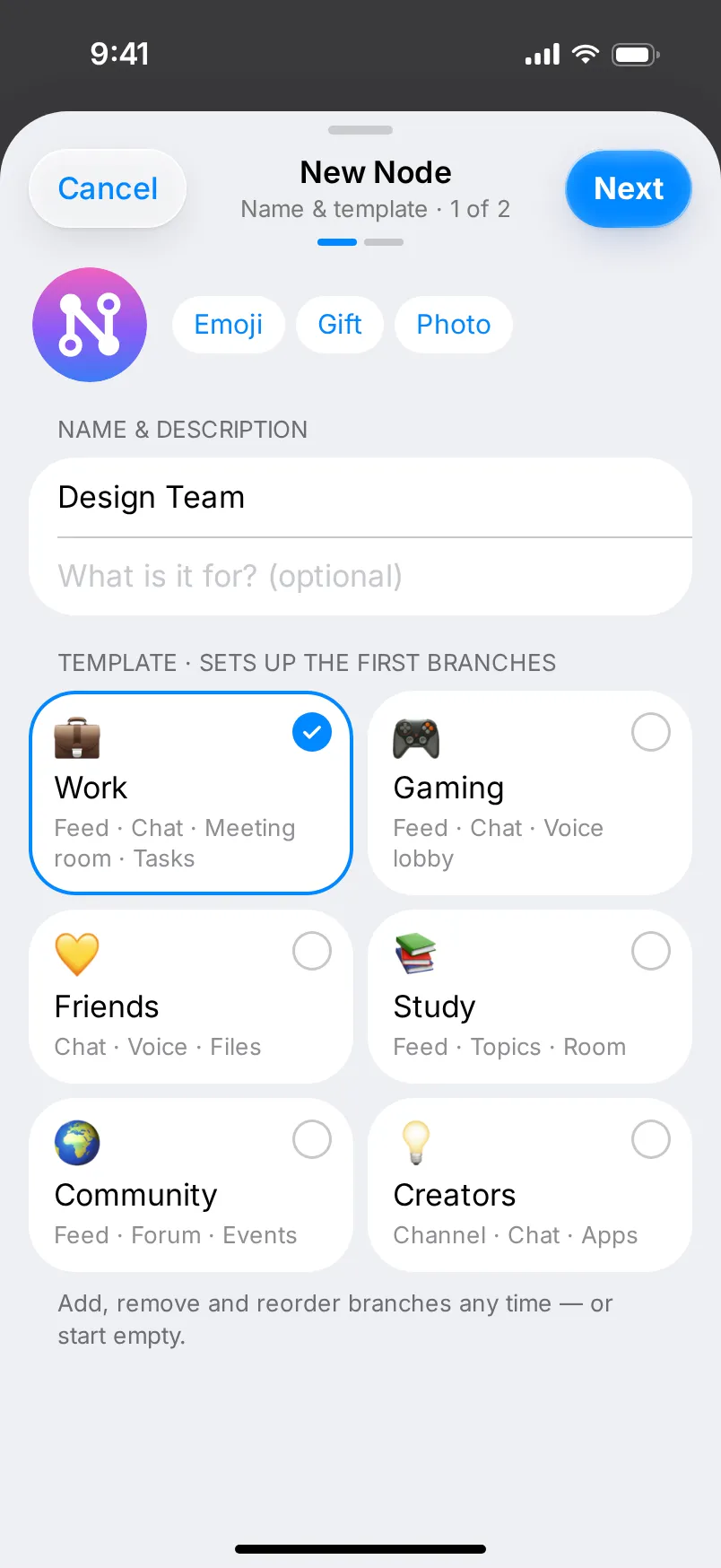
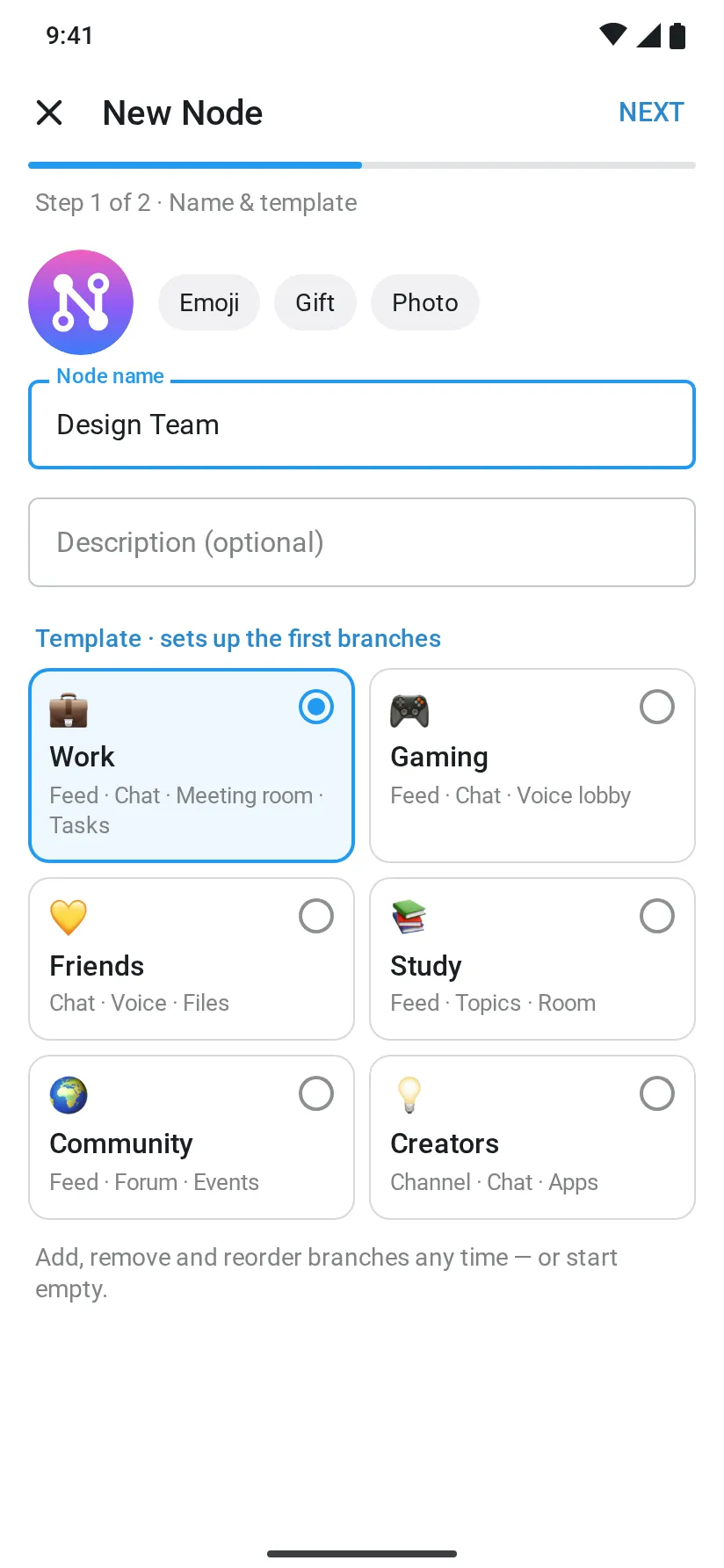
After — New Node · template, iOS, refreshed design
After · hi-fiBefore · wireframe
New Node · template

Android

Before — Chats · switch identity, Android, frame from the low-fi wireframe
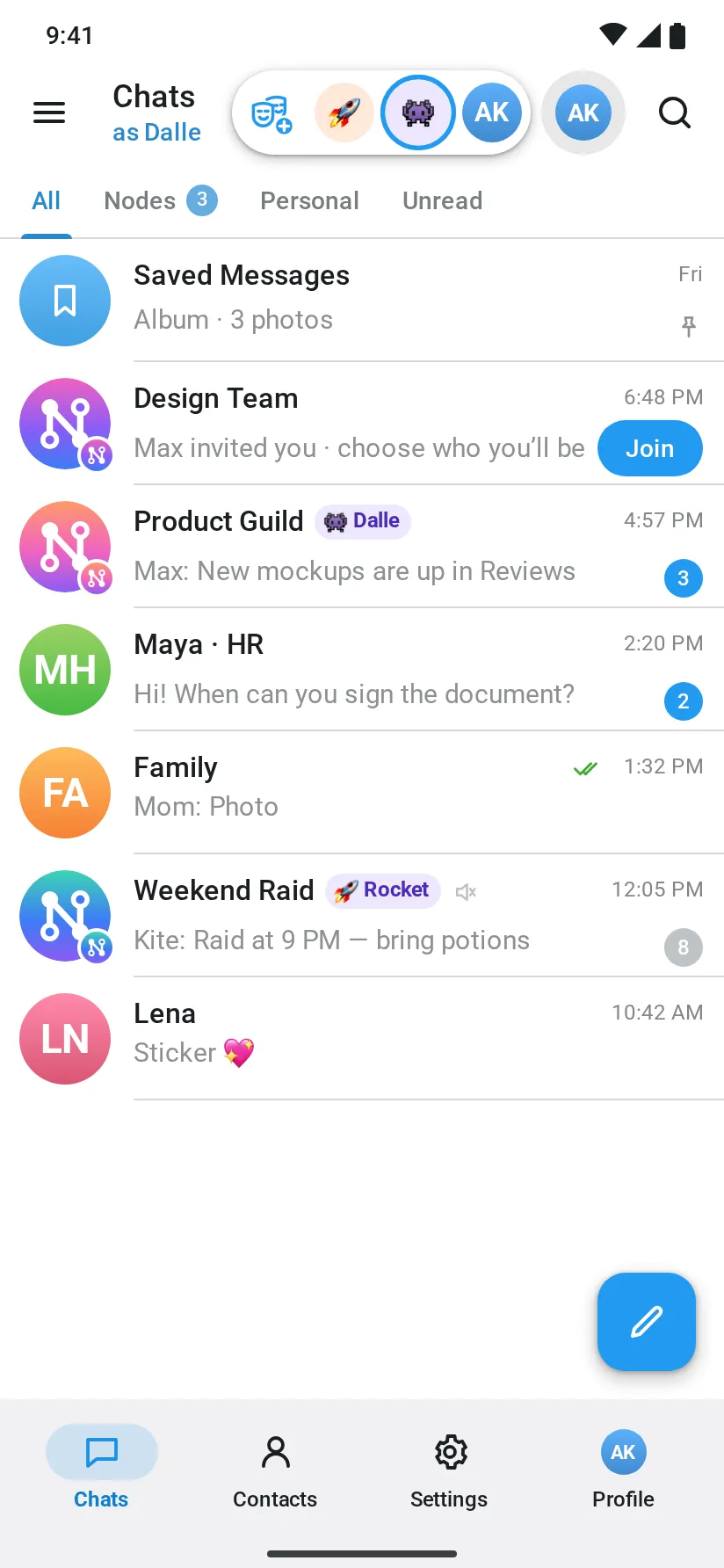
After — Chats · switch identity, Android, refreshed design
After · hi-fiBefore · wireframe
Chats · switch identity
Before — Join as an alias, Android, frame from the low-fi wireframe
After — Join as an alias, Android, refreshed design
After · hi-fiBefore · wireframe
Join as an alias
Before — Node workspace, Android, frame from the low-fi wireframe
After — Node workspace, Android, refreshed design
After · hi-fiBefore · wireframe
Node workspace
Before — New Node · template, Android, frame from the low-fi wireframe
After — New Node · template, Android, refreshed design
After · hi-fiBefore · wireframe
New Node · template
  1. 01

    Copy and labels

    No typos or placeholders on the refreshed screens («joinig», «Wen», the stray «Z» section title, «Role:Member»), sentence case, correct step titles on Android.

  2. 02

    Visible states

    Selected template and alias get a checkmark or radio; «Next» stays disabled until the Node has a name; the link says Available / Taken / Invalid.

  3. 03

    One primary action

    The send-arrow «↑» is gone from sheet headers: text «Cancel / Next / Create» on iOS, a text button in the Android dialog, and one «Join as …» per sheet.

  4. 04

    Right tool per branch

    No message field under voice rooms and Mini Apps; channels get «Mute / Discuss», chats get a composer that names your alias.

  5. 05

    Telegram, not «Telegram-like»

    Colours, sizes and radii come from Telegram’s own source code: iOS rows 76 with 60 pt avatars and a 64 pt Liquid Glass tab bar; Android’s white 56 dp app bar, 70 dp rows and a Material 3 navigation bar. The tab sets are Telegram’s defaults: Contacts · Calls · Chats · Settings on iOS, Chats · Contacts · Settings · Profile on Android.

  6. 06

    Neutral assets, real emoji

    Photos of people, the Telegram and Figma logos and the doodle wallpaper are replaced with Telegram’s avatar gradients, initials and our Node mark; emoji are Apple’s set, as Telegram shows them.

04Old flow → new flow

Fewer steps where it counts — and the one-gesture switch kept.

Counted on the contest file and on the refreshed screens: the minimum taps or gestures a person needs, typing not included.

Create a Node

Before · contest file
  1. Compose
  2. New Message sheet
  3. New Node
  4. Identity · ↑
  5. Template · pick · ↑
  6. Privacy · ↑
6 taps · 3 wizard steps
After · refresh
  1. Compose
  2. New Node
  3. Name & template · Next
  4. You & privacy · Create
4 taps · 2 steps

Template comes preselected and sits next to the name; the alias moved to step two, next to privacy.

Join a Node as an alias

Before · contest file
  1. Join in the list
  2. Sheet: «↑» or «Join»
  3. Other alias: «Change» → not designed
2 taps · alias choice hidden
After · refresh
  1. Join in the list
  2. Pick an alias card (optional)
  3. Join as Dalle
2–3 taps · choice in the sheet

Same tap count, but the choice is visible and there is a single primary button.

Switch identity

Before · contest file
  1. Press the alias
  2. Swipe across the pills
1 gesture · no feedback
After · refresh
  1. Press your avatar
  2. Slide to Dalle · release
1 gesture · ring, live «as Dalle»

1 → 1: the entry’s press → slide along the capsule stays one gesture. What changed is feedback — the face under the finger grows and takes the ring, its name previews under the title, and the capsule slides back into the button showing the new alias.

Get into a voice room

Before · contest file
  1. Daily Meeting in the sidebar
  2. Join Room
2 taps · composer still shown
After · refresh
  1. Meeting in the rail
  2. Join room
2 taps · alias shown before joining

Same path; the room now says «You’ll join as Dalle · mic off» and offers «Listen only».

05Brand system

Telegram’s own tokens, with one violet for Nodes.

Every colour, size and radius is read from Telegram’s open-source clients: iOS accent #0088FF, secondary #8E8E93, grouped background #EFEFF4; Android’s white app bar, accent #229AF0 and #298ACF for text. Node violet #7C4DFF marks what belongs to a Node or an alias. Inter stands in for SF Pro on iOS; Android keeps Roboto.

Nodes
Horizontal lockup
Compact · square slots
Telegram Nodes

Telegram × Nodes: the official Telegram logo (from telegram.org, unchanged) next to our Node mark — four nodes joined into an «N» on the Node gradient. Horizontal lockup where there is room, compact one for square slots. The Telegram logo marks the contest the entry was made for; it does not mean Telegram endorses or ships this feature.

01 — PaletteLight · Telegram iOS 26 glass + Telegram Android 12
PrimaryTelegram iOS accent (defaultDayAccentColor)
#0088FF
vs bg 3.07:1 · label 5.97:1
AccentNode violet
#7C4DFF
on bg 4.2:1
TextPrimary text
#000000
on bg 18.32:1
BackgroundTelegram grouped background
#EFEFF4
text on it 18.32:1
SurfaceSurface
#FFFFFF
text on it 21:1
MutedTelegram section header / free text
#6D6D72
on bg 4.49:1
Brand gradient · #F062C0 → #8B5CF6 → #3D7BF5 · illustration / covers only
02 — TypographyGoogle Fonts
HeadingInterBodyInter (one family)
Heading
Inter 700
Telegram Nodes
Subheading
Inter 700
Small teams, DAOs and communities that already live in Telegram
Body
Inter 400 · 16/26
One account, many faces: Nodes group a community’s channel, chat, rooms and apps in one space — and you join each one as the alias that fits.
Caption
Inter 600 · 12
contest entry · messaging
GlyphsAaBbCc 0123456789 &@€%→
06Screens

Four moments, two platforms, one language.

Each pair shows the same state with the same sample data — iOS on the left, Android on the right.

Telegram Nodes — Chats · switch identity · iOS
iOS
Telegram Nodes — Chats · switch identity · Android
Android
01

Chats · switch identity

Press your avatar and a slim capsule slides out of it to the side — Alex (main profile) first, then Dalle, Rocket and «New alias». Slide the finger along: the face under it takes the ring and its name shows under «Chats»; letting go switches the list. Android does the same with a Material surface. Node rows in «All» carry the alias you use there.

Telegram Nodes — Join as an alias · iOS
iOS
Telegram Nodes — Join as an alias · Android
Android
02

Join as an alias

What is inside the Node, who invited you, three ways to show up and one button that says who you will be. Android uses a modal bottom sheet with a radio list.

Telegram Nodes — Node workspace · iOS
iOS
Telegram Nodes — Node workspace · Android
Android
03

Node workspace

Feed, Rooms and Apps in a branch rail — Liquid Glass on iOS, a Material navigation rail on Android — over Telegram’s classic wallpaper colours. Posts are bubbles; channels offer «Mute / Discuss» instead of a message field.

Telegram Nodes — New Node · 1 of 2 · iOS
iOS
Telegram Nodes — New Node · 1 of 2 · Android
Android
04

New Node · 1 of 2

Name and template on one step, the selected template clearly marked, «Next» ready only when the Node has a name. Step two (you & privacy) lives in the prototype.

05

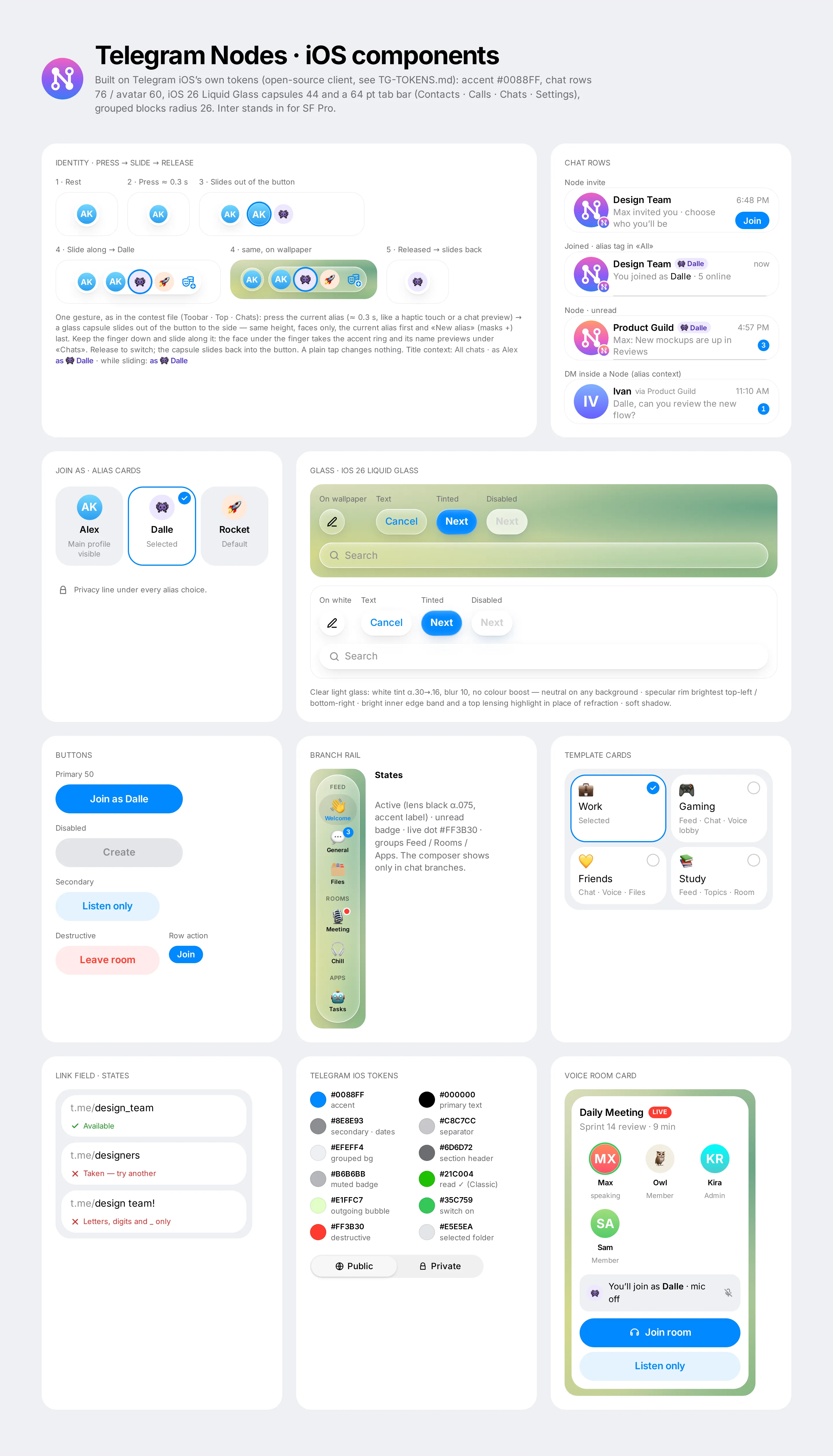
Component sheet · iOS

Identity gesture step by step (rest, pressed, capsule slides out, slide along to Dalle, released), chat rows (invite, joined, unread, DM inside a Node), alias cards, iOS 26 Liquid Glass on buttons and search (on wallpaper and on white), buttons with disabled states, branch rail, template cards, link field states, token swatches and the voice room card.

06

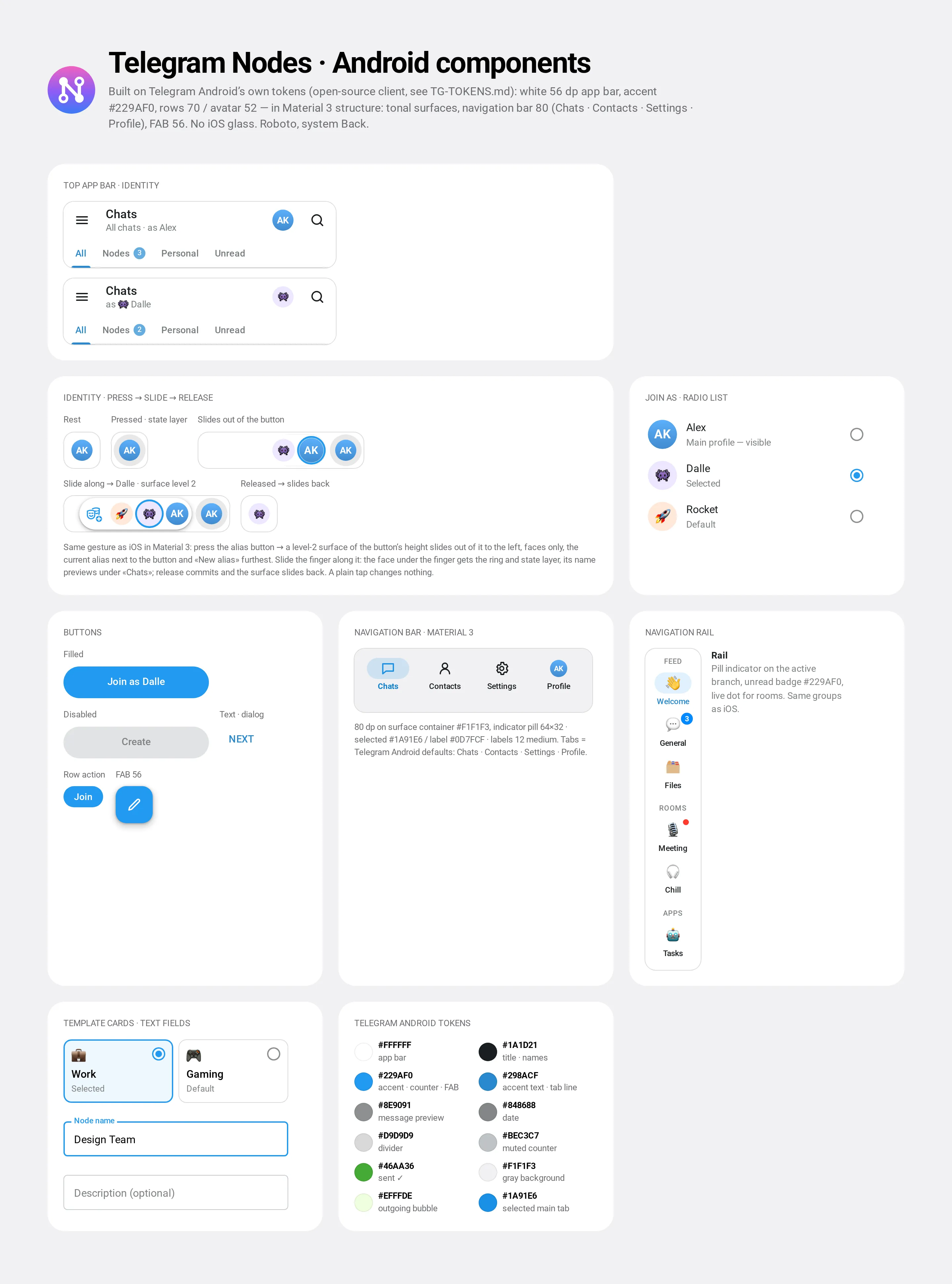
Component sheet · Android

White top app bar with the identity button and its press → slide states (side surface), radio list, filled / text / FAB buttons, Material 3 navigation bar with Telegram’s default tabs, navigation rail, selectable template cards, outlined text fields and token swatches.

07Interactive prototype

Click through the new flow.

Our own clickable iOS prototype, built from the same markup as the screens. It works with a mouse and with touch; a pulsing ring shows the next step.

Try this

  1. 01Press your avatar, slide to Dalle and let go — the list keeps only Dalle’s Nodes.
  2. 02Tap Join on Design Team, try another alias card, then «Join as Dalle».
  3. 03Open Meeting in the rail and join the room — you appear as Dalle.
  4. 04Go back, tap the compose button and create a Node in two steps: type a name, pick a template, choose who you are and a link.

Sample data only; nothing is sent anywhere. Branches other than Welcome, General and Meeting are out of scope for the prototype.

Open full screen
Mood

Many facesOne spaceNative

08Dev · architecture

A wrapper, not a new app.

Nodes re-use the blocks Telegram already has, so the work is in identity and navigation — not in new chat types.

Nodes re-use the blocks Telegram already has, so the work is in identity and navigation — not in new chat types.

PRIVATEAccountphone number · main profile ALIAS · MAINAlexmain profile · personal chats ALIASDallename · avatar · bio ALIASRocketname · avatar · bio 1 : N Design Teamas Dalle · Member Product Guildas Dalle · Designer Weekend Raidas Rocket · Raider NODES · ROLE PER NODE NODE = SMART WRAPPER existing Telegram blocks, grouped Feed= ChannelChat= GroupForum= TopicsRoom= Voice ChatApps= Mini Apps
One account → many aliases (1 : N) → each alias joins Nodes with its own role → a Node groups existing blocks. Sample names.

Glossary

Node
A space for one community: a smart wrapper over a channel, a group, topics, voice chats and Mini Apps
Branch
One block inside a Node, shown in the rail under Feed, Rooms or Apps
Feed
Broadcast branch = a channel; members read and react, discussion goes to a chat
Room
Voice branch = a voice chat; you join as your alias, mic off by default
Alias
Name, avatar and bio for one or more Nodes; the phone number and main profile stay hidden
Layout
The order and grouping of branches an admin sets for everyone (admin tools)

Navigation

Chats
Global list; press → slide on your avatar filters it to one alias, «All» shows Node rows tagged with their alias
Node space
Header (Node, members, your alias) + branch rail + the branch itself; Back returns to Chats
Branch types
Feed → read + Mute / Discuss · Chat → composer as alias · Room → join card · Apps → Mini App
Admin
Node settings → Layouts, Appearance, Roles (iOS, contest file)

Admin · create a Node

  1. Compose
  2. New Node
  3. Name + template
  4. Alias + privacy + link
  5. Workspace
  6. Copy invite link

Edge cases empty name keeps «Next» disabled · link taken / too short / invalid characters · private Node gets an invite link instead

Member · discover and join

  1. Invite in Chats
  2. Join sheet
  3. Pick alias
  4. Join as …
  5. Workspace
  6. Meeting → Join room

Edge cases main profile chosen → «visible to members» note · already joined → the row opens the Node instead of the sheet

  1. 01

    Spec & glossary

    Node entity, Alias / Feed / Room glossary and the navigation map — written for the contest.

    Contest stage
  2. 02

    User flows

    Admin creation and member discovery / join, mapped as diagrams with edge cases.

    Contest stage
  3. 03

    Code-based POC

    A small HTML/CSS/JS proof of concept to validate alias switching and the Node wizard.

    Contest stage
  4. 04

    Audit & refresh

    14 findings, simplified flows, four screens × two platforms, component sheets.

    Omnisense
  5. 05

    Prototype & motion

    Clickable iOS prototype from the screen markup; the motion preview is cut from its states.

    Omnisense

Not claimed anywhere on this page: users, retention or any other metric, a release date, or any involvement of Telegram beyond running the contest.

09FAQ

Questions & answers

Is Telegram Nodes an official Telegram feature?

No. It was designed and submitted as an official entry to Telegram's design contest. It is a proposal, not a shipped feature: nothing here is live in Telegram, and no usage figures are implied.

What are Nodes and Aliases?

Nodes group a community's channel, group, topics, voice chats and Mini Apps into one space. Aliases let one account use a different name in each Node without exposing the phone number.

What did Omnisense do?

We audited the contest file (14 findings), cut the flows that took the most steps, refreshed four key screens on iOS and Android in one design language, drew two component sheets and built a clickable iOS prototype of the new flow.

Does it add new chat types?

No. Nodes re-use the blocks Telegram already has, so the work is in identity and navigation — a wrapper, not a new app.

How do iOS and Android differ?

On iOS, the branch rail uses iOS 26 Liquid Glass. Android follows Material 3 structure in Telegram Android's colours, with no iOS glass.

→More work

Related projects

All work

Have a feature that needs a second look?

We audit flows, cut the steps that cost the most and refresh the screens — on iOS and Android at once.

Official entry to the Telegram design contest. The feature shown has not been released and is not an official Telegram product.